1. Introduction — Why Backup Success Is Not Recovery Assurance
Backups are essential, but they are not the same as a proven business recovery capability. A backup application may report that a scheduled job completed without errors while the organization still lacks a usable copy of a critical database, the administrative credentials needed to restore it, or the infrastructure dependencies required to bring the application online.
Ransomware changes the recovery problem. Attackers may target accessible backup repositories, identity systems, virtualization management, shared storage, and privileged accounts. Even clean backup data is of limited value if an organization cannot rebuild a trustworthy operating environment or verify that restored applications are safe to reconnect.
For organizations planning ransomware recovery in Nepal, the practical goal is not simply “more backups.” It is a recovery architecture that fits the organization’s workload priorities, available IT skills, off-site connectivity, power resilience, and realistic business downtime tolerance.
2. Why Backup Jobs Succeed Yet Restores Fail
A green job status usually confirms that a particular backup operation finished according to its software checks. It does not automatically demonstrate application consistency, availability of an uncompromised restore point, recoverability of passwords or keys, or success of a full disaster recovery procedure. Consider these failure scenarios:
Incomplete or corrupted data
A backup file may be incomplete, unreadable, or missing application-critical transaction data even when the job was recorded as successful.
Compromised access
Compromised credentials or encryption keys may allow attackers to delete copies or block recovery operations.
Dependency failures
Identity, DNS, databases, storage, and application services may need a specific recovery order before users can resume work.
RTO/RPO mismatch
A restore may eventually work but take longer or lose more data than the business can tolerate.
Operational lesson: measure whether a representative workload can be restored and validated under realistic conditions. The true success criteria are usable data, working applications, acceptable downtime, and an environment that is safe to return to service.
3. Understanding Recovery Point Objective and Recovery Time Objective
Recovery requirements should come from business impact analysis, not from an arbitrary default in backup software. The two most important targets are:
RPO — Recovery Point Objective
The maximum acceptable amount of data loss measured in time. An RPO of four hours means the business plans for losing no more than approximately four hours of recent changes, assuming the recovery design meets that objective.
Illustrative example only: a financial application may require much more frequent recovery points than a test environment.
RTO — Recovery Time Objective
The target time to restore a service to its agreed operational state following an interruption. An RTO of eight hours requires adequate capacity, access, data, dependencies, and tested procedures—not merely a fast backup job.
Illustrative example only: application validation and user acceptance are part of the recovery timeline.
A low RPO may require frequent backups, snapshots, or replication. A low RTO may require warm standby infrastructure, simpler recovery sequencing, and automation. These objectives are related, but improving one does not automatically improve the other. Both should be documented and tested for each critical workload.
4. Applying the 3-2-1-1-0 Backup Strategy
The 3-2-1-1-0 model is a useful planning discipline popularized by Veeam. It extends multiple-copy protection with an offline or immutable layer and verified backup health. It is a design guideline, not a guarantee of ransomware immunity.
3 copies
Production data plus at least two independent backup copies.
2 media
Use suitable diversity of media or storage failure domains.
1 off-site
Maintain at least one copy away from the primary site.
1 protected
Keep a copy offline, air-gapped, or immutable under controlled access.
0 unresolved errors
Investigate verification failures and prove that selected restores work.
Organizations should interpret “zero errors” as an ongoing verification objective: backup failures and restore-test exceptions must be detected, investigated, and resolved. It is not proof that every possible restore scenario has been tested. Immutable storage also requires correct retention policies, credential separation, and protection against compromised administrators or configuration changes.
5. Designing a Resilient Backup and Recovery Architecture
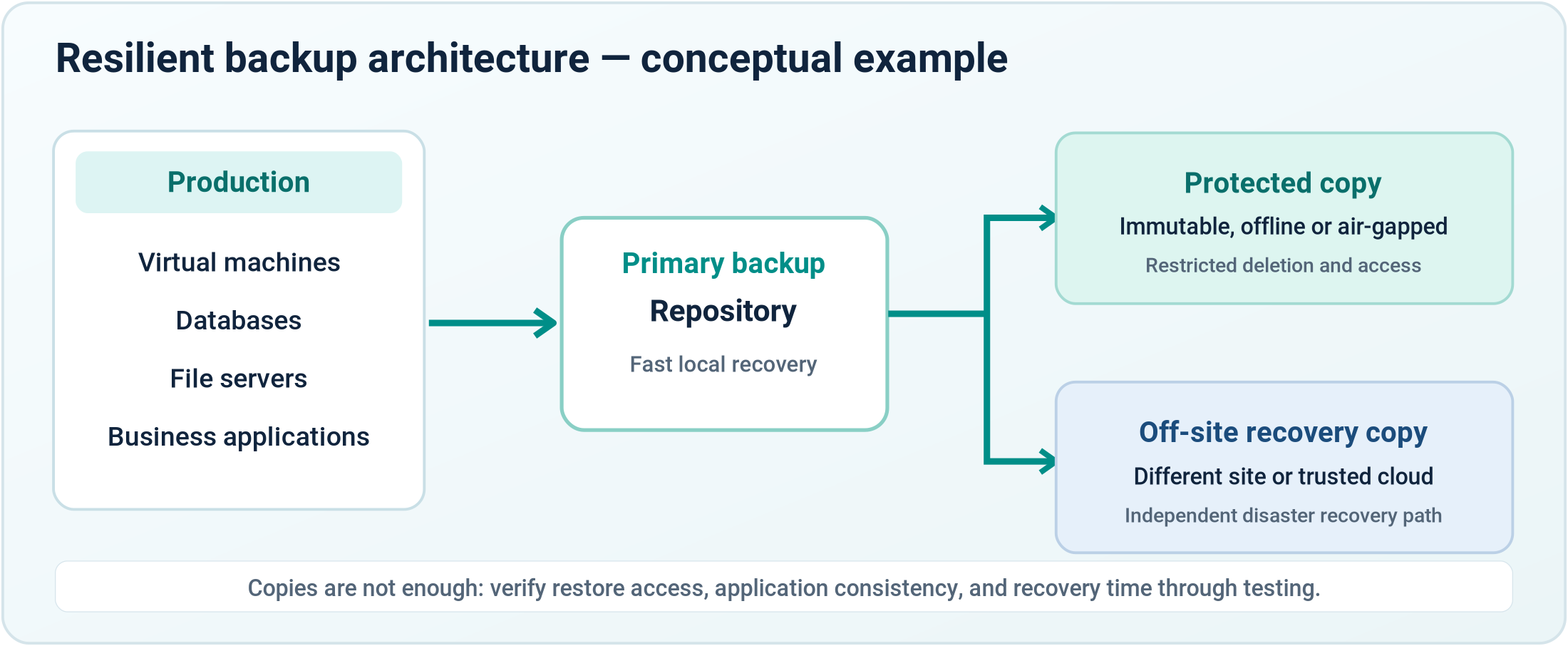
A practical architecture separates production workloads from primary backup storage and adds an independently protected recovery copy. The illustration below is conceptual; actual deployment depends on workload size, retention, security boundaries, available bandwidth, and the provider’s recovery objectives.
Production: identify virtual machines, databases, file services, and critical applications. Confirm consistent backup processing and understand transaction logs, application agents, or snapshot limitations.
Primary repository: size backup capacity and throughput for retention and recovery, not only daily ingestion. Restrict management access and monitor repository health.
Protected copy: maintain an offline, air-gapped, or immutable copy with independent access controls and retention safeguards. Do not assume a separate folder on the same reachable system is equivalent to isolation.
Off-site copy: place recovery data in a different physical or logical failure domain. Test whether that copy can be accessed when the main office, primary internet link, identity system, or backup server is unavailable.
6. Backup Security, Immutability and Access Separation
Ransomware resilience depends on the administrative security of the backup environment. Attackers who obtain privileged access may try to disable schedules, erase repositories, change retention settings, or compromise the systems used for restoration.
Separate identities
Use dedicated privileged backup accounts and minimize shared administrative credentials.
Strong authentication
Protect management interfaces and privileged operations with multifactor authentication where supported.
Restricted deletion
Limit who can remove backups, adjust immutable retention, or disable security controls.
Retention governance
Document backup frequency, generations, retention periods, and change approval.
Network isolation
Restrict backup management networks and connections to approved systems and services.
Encrypted backups can protect confidentiality, but encryption is not immutability. Immutability can reduce unauthorized deletion or alteration, but it cannot by itself guarantee the availability of a clean restore point or the successful recovery of an application. Combine the controls and periodically verify them.
7. Recovery Dependencies and the Correct Restoration Order
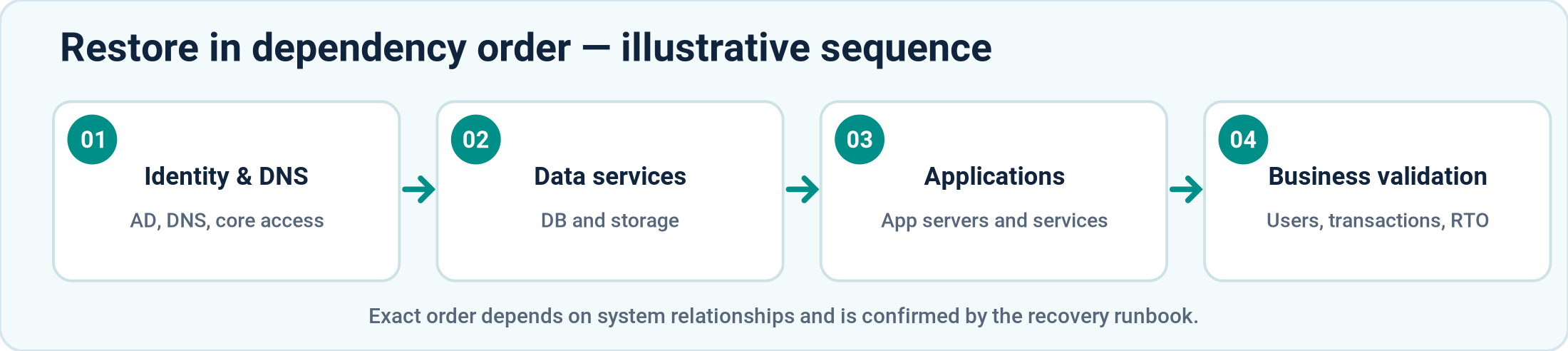
Recovering individual virtual machines in random order can create a long and confusing outage. A business application may depend on directory services, DNS, databases, application servers, storage permissions, firewall rules, and client authentication. The recovery runbook should document these dependencies and the order in which they must be validated.
For a typical enterprise environment, foundational identity and network services may be restored before databases and application tiers, followed by application functionality and business-user verification. However, this is only an example: the correct sequence depends on the environment, and a compromise of identity systems may require rebuilding them from trusted sources rather than restoring them directly.
Designated system owners should define which applications are essential, which data sets are authoritative, what credentials and licenses are needed, where installation media and configuration backups are stored, and who can approve the return to production.
8. Recovery Testing Matrix — What Should Actually Be Verified?
A meaningful test program covers more than restoring a file. Run smaller technical tests regularly and periodically exercise business-critical workflows end-to-end. Record duration, failures, owner sign-off, and the changes needed to meet RPO/RTO targets.
Test type
Acceptance evidence
Restore representative files and verify access permissions and content integrity.
VM restore / instant recovery
Boot selected virtual machines in a controlled recovery network and test service operation.
Verify application consistency, required logs, and the ability to open a functional database.
Confirm an actual application workflow with the business or application owner.
Recover into a segregated environment and validate that restored workloads are clean.
Test site-level dependencies, staffing, communications, recovery order, and measured RTO/RPO.
Use a documented sample of workloads and rotate coverage over time. A completed test should produce evidence: screenshots or logs, an incident or change ticket, the test operator, the elapsed recovery time, data-integrity results, and corrective actions. Avoid claiming that an untested workload has been validated.
9. Practical Ransomware Recovery Playbook
When ransomware is suspected, the first objective is to contain the incident without destroying evidence or making uncontrolled changes. Recovery actions should follow an incident response plan, involve responsible decision-makers, and prioritize trusted systems and data.
01. Declare & contain
Activate incident response, isolate affected systems and safeguard remaining clean copies.
02. Preserve evidence
Capture relevant logs and evidence before indiscriminate rebuilding where feasible.
03. Assess scope
Identify affected services, compromised accounts and trustworthy restore points.
04. Rebuild clean
Prepare a trusted, segmented recovery environment with patched systems.
05. Restore
Recover from validated copies and follow dependency-aware sequencing.
06. Validate & return
Test services, security controls and business workflows before reconnection.
During response, preserve relevant evidence and communicate with stakeholders, insurers, advisers, and authorities as required. Do not reconnect restored systems until the incident team has reasonable assurance that the original compromise path has been addressed. After restoration, review the incident and update controls, runbooks, and recovery targets.
10. Practical Considerations for Organizations in Nepal
Ransomware recovery strategies must reflect local operating realities. Two organizations using the same backup product can have very different recovery performance because of infrastructure size, available specialists, internet connectivity, electrical resilience, and the distance to the secondary recovery site.
Power resilience
Plan UPS runtime, generator availability, safe shutdown, and restoration of dependent network/storage systems.
Off-site connectivity
Measure upload windows, restore bandwidth, alternate ISP access, and recovery options when the primary circuit is unavailable.
Hardware capacity
Confirm that replacement compute, storage, and compatible drivers or hypervisors can be obtained or made available when needed.
On-premises & cloud
Choose off-site and cloud protection according to recovery times, data locality, cost, access controls, and available connectivity.
Local operational readiness
Assign named owners, review vendor support arrangements, and rehearse recovery with the team that will operate it.
In Nepal, the right architecture may combine an on-premises fast-recovery repository with an off-site immutable or offline copy. Alternatively, it may rely more heavily on hosted recovery infrastructure. Neither model is automatically best; the decision should follow a costed business-impact assessment and realistic recovery testing.
11. Monitoring and Measurable Recovery Readiness
A backup dashboard is one input to readiness reporting. Leadership and the IT team should also see whether the recovery design can satisfy service expectations. Useful indicators include:
Backup job health
Daily failures, warning trends, and unresolved exceptions
Restore test results
Last successful file, VM, database, and application tests
RPO performance
Age of the latest usable point against each critical workload target
RTO performance
Actual restore duration measured in exercises
Repository capacity
Forecast capacity and immutability-retention headroom
Access security
Privileged account reviews, MFA, changes and anomalous deletions
Runbook freshness
Last plan review, test owner, contact list, and documented actions
12. Conclusion — Measure the Ability to Recover
Backup success is necessary, but it is only the beginning of ransomware resilience. Organizations need trustworthy recovery points, appropriate separation of privileges, immutable or offline protection, accurate application dependencies, available restore infrastructure, and a recovery plan that has been tested with real workloads.
The most useful question for an IT team is not “Did last night’s backup finish?” but “Can we restore the right business services, from a trusted point in time, within our agreed limits, and prove that they work?” Designing, practicing, and improving that capability is how backups become business continuity.
Technical References & Further Reading
Build a More Resilient Recovery Strategy
Need to assess ransomware recovery readiness, design immutable backup storage, define realistic RPO/RTO targets, or validate business-critical restores? I welcome consulting discussions with organizations in Nepal.